Micromax A94 Firmware Tested & Flashing Tutorial

Version 1
Micromax_A94_X4510M_MMX_IND_R03_4Gb_band15
DOWNLOAD HERE
Version 2
Micromax_A94_X4510M_MMX_IND_R06_4Gb_band15
DOWNLOAD HERE
Requirements:
1.android device and windows pc
2.dfu tools from here
3.pda net from here(to install driver for your device)
4.stock rom.zip file of your device(click here for micromax a94)
5.To download driver for micromax A94 click here
Steps to follow:
1.make sure your device is off before performing this
2.extract stock rom to any location in your pc, desktop or any drive
3.extract the dfu.zip file then open dfu.exe from extracted folder
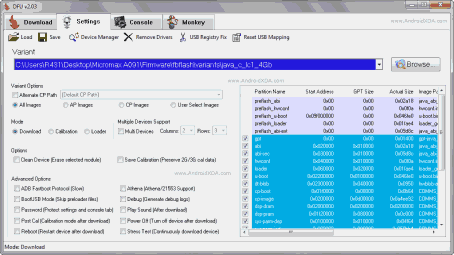
4.select browse option in dfu tools
5.select the extracted folder of your stock rom which looks something like this
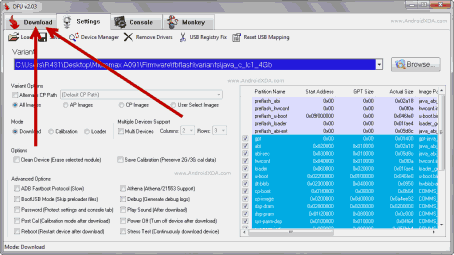
 6.Then click on download in above menu bar
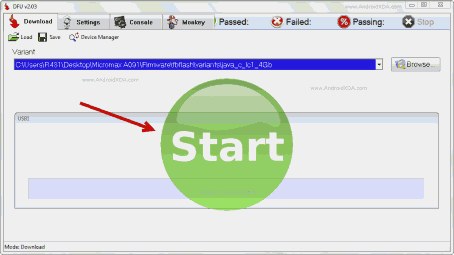
7.click on start button
8.boot into recovery mode and connect to pc
(*Most devices boots into recovery by pressing power off+volume down)
9.if process not starts in 2-5min. then just select option “reboot system now” from recovery then process is starting
All Done…‼‼ Enjoy…!!!
SEE Flashing Tutorial Video

Version 1
Micromax_A94_X4510M_MMX_IND_R03_4Gb_band15
DOWNLOAD HERE
Version 2
Micromax_A94_X4510M_MMX_IND_R06_4Gb_band15
DOWNLOAD HERE
Requirements:
1.android device and windows pc
2.dfu tools from here
3.pda net from here(to install driver for your device)
4.stock rom.zip file of your device(click here for micromax a94)
5.To download driver for micromax A94 click here
Steps to follow:
1.make sure your device is off before performing this
2.extract stock rom to any location in your pc, desktop or any drive
3.extract the dfu.zip file then open dfu.exe from extracted folder
4.select browse option in dfu tools
5.select the extracted folder of your stock rom which looks something like this
7.click on start button
8.boot into recovery mode and connect to pc
(*Most devices boots into recovery by pressing power off+volume down)
9.if process not starts in 2-5min. then just select option “reboot system now” from recovery then process is starting
All Done…‼‼ Enjoy…!!!
SEE Flashing Tutorial Video
Comments